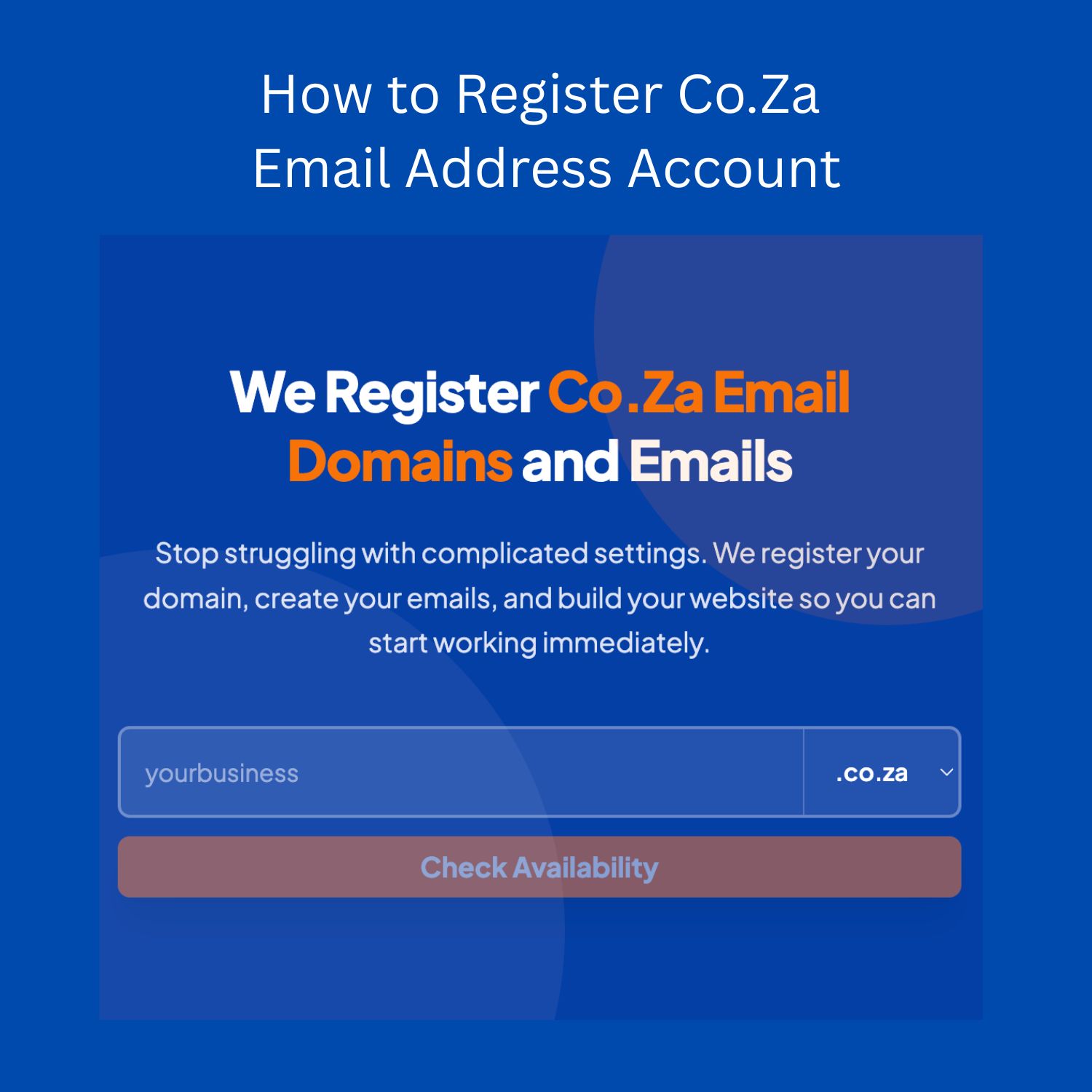
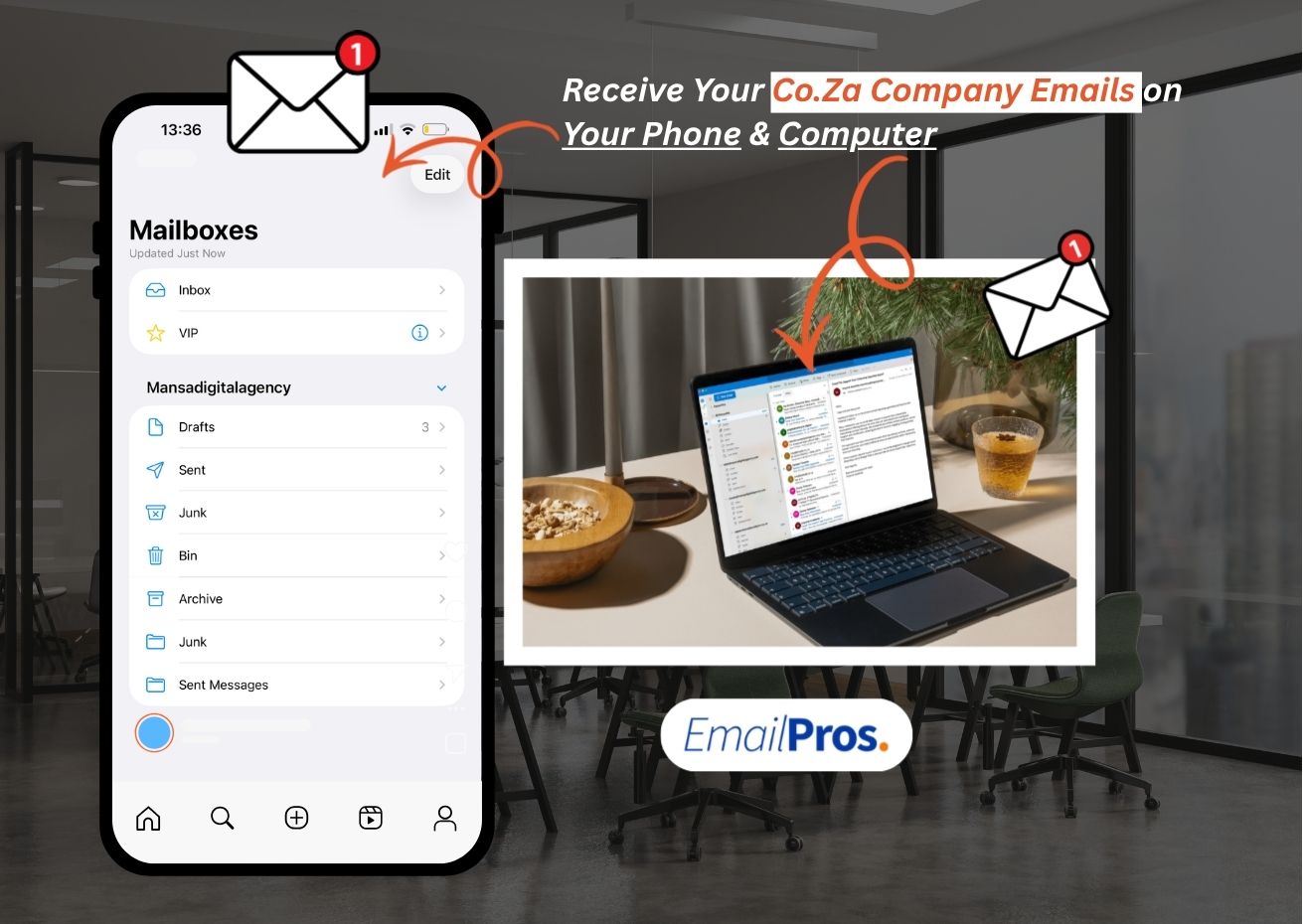
Creating a Co.Za email address is one of the most effective ways to make your South African business look credible and professional online. A Co.Za email is a custom business email that ends with your company’s own .co.za domain name instead of using free public ones like Gmail or Yahoo. For example, instead of using limpopologistics@gmail.com, you can use info@limpopologistics.co.za, which instantly gives your brand a more established image.

In 2025, having a South African business email that matches your domain name is a trust signal. Customers, suppliers, and government institutions all prefer dealing with businesses that have registered domains and professional emails. It shows that your business is officially set up, locally based, and serious about communication. This is especially important for tenders, client proposals, and supplier registrations, where free email addresses are often rejected.

The good news is that you can create your Co.Za email and have it running within 24 hours, provided your domain name is available and your hosting provider processes it quickly. If you prefer a hassle-free option, EmailPros.co.za offers a complete setup service — including domain registration, email creation, and technical configuration — all done for you.

What Is a Co.Za Email Address?

What Is a Co.Za Email Address

A Co.Za email address is a professional business email that uses your company’s own .co.za domain name, the official domain extension for South Africa. When you register a co za domain, it becomes part of the country’s domain system managed by the ZA Domain Name Authority (ZADNA), which oversees all South African domain registrations and ensures they follow national standards for security and compliance. In simple terms, your co za email connects your brand to your South African identity online, giving your business credibility from the very first message you send.

When you own a co za domain, you can create multiple business email addresses that reflect your company’s departments or team members. Common examples include:

Unlike free platforms such as Gmail, Yahoo, or Outlook.com, a professional email address South Africa based on your co za domain shows that your business is legitimate and registered. It builds trust with clients, suppliers, and government institutions who prefer engaging with companies that use South African business emails rather than free or foreign domains.

Your co za domain email also gives you control over your hosting, storage, and security. It allows you to comply with local privacy regulations like POPIA, ensuring that your data remains on South African servers. This level of control, combined with local support and fast delivery, makes the co za business email the most trusted choice for any small or medium business in South Africa.

In short, a co za email address is a digital business card that strengthens your brand identity, improves customer confidence, and establishes your business as a credible South African company online.

Get a Co. Za Business Email Today

Page 1 of 4

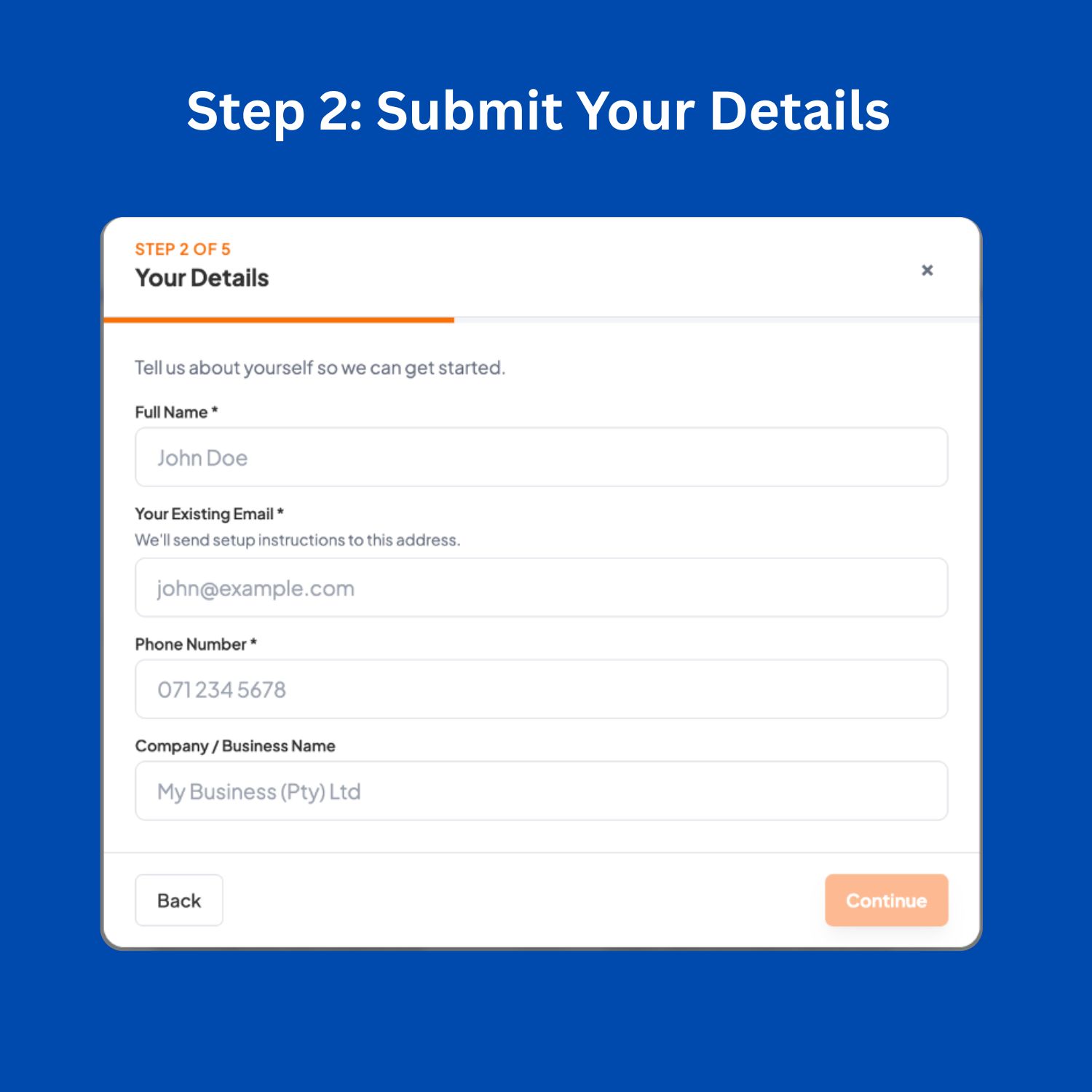
We will use this email to send you email settings and further communications

You can choose the domain name for your company. For example: www."mycompanyname".co.za

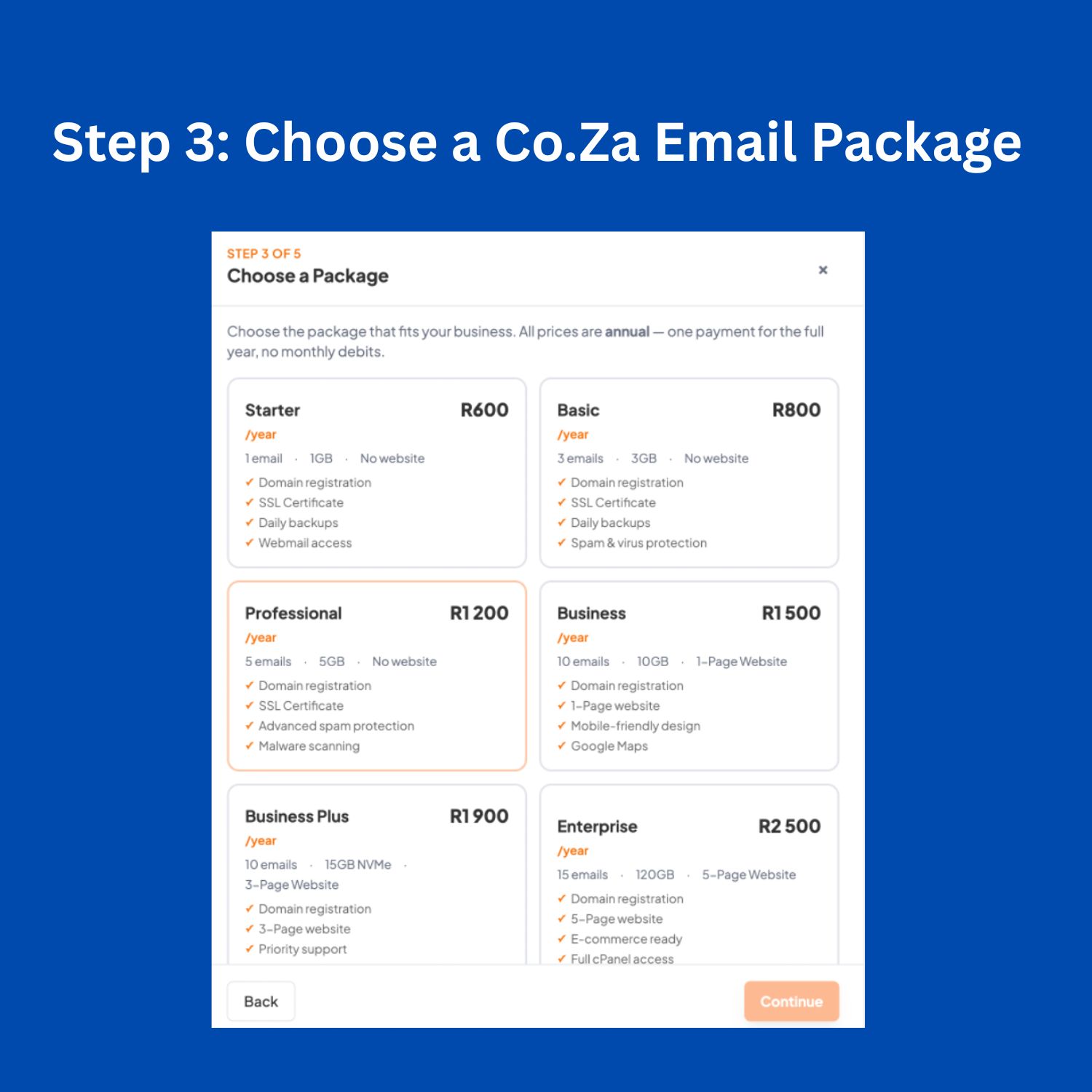
You will get up to 5x Email Addresses for Your Business.

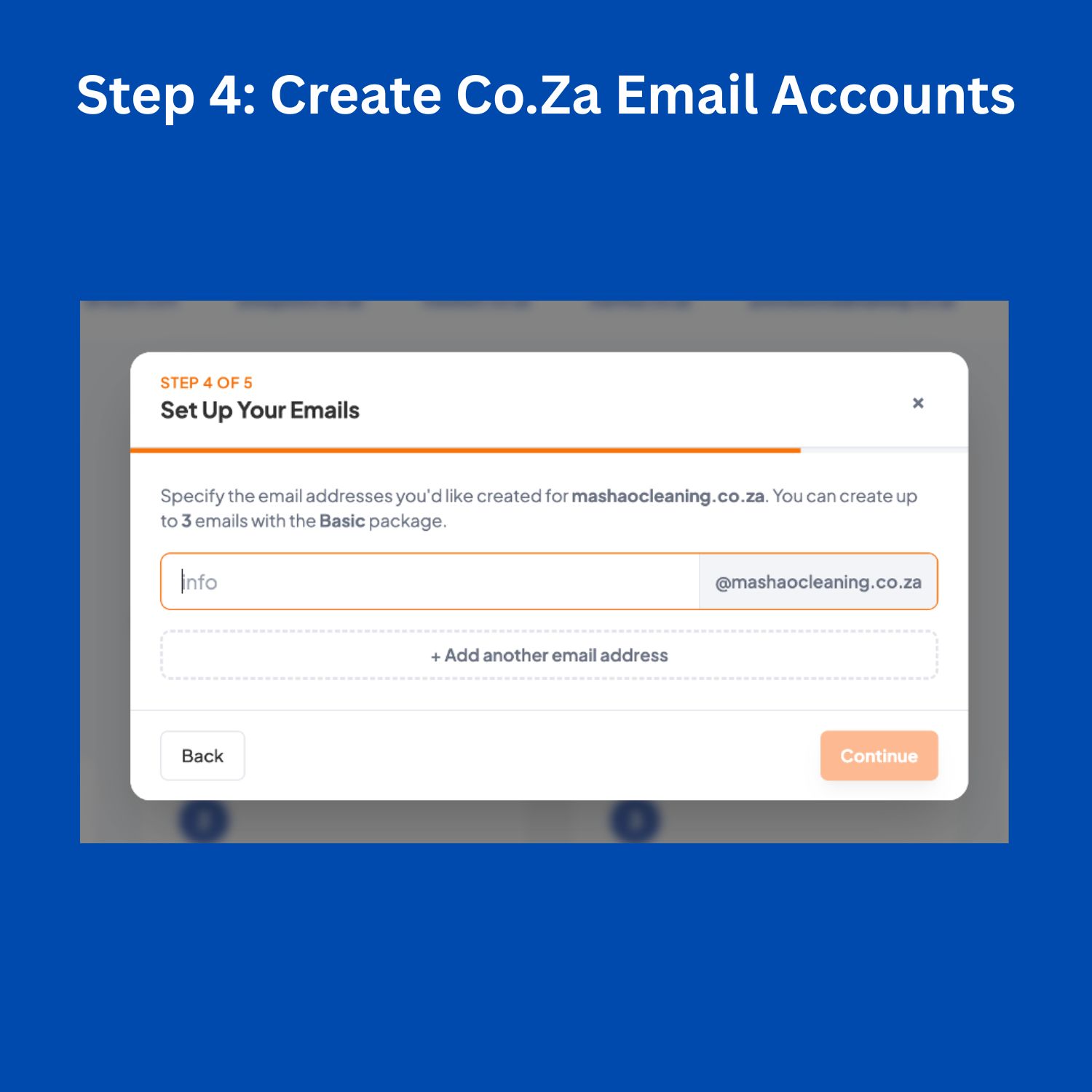
Give us the names of your email addresses. Example, info@mybusinessname.co.za, or sizwe@mybusinessname.co.za, etc:

Payment Due Now: R1200

Note: We offer a 7-day money-back guarantee if you are not satisfied with our services — no questions asked.

Payment Due Now: R1200

EFT

Please make a payment of R1200, using the following details so that we can proceed with your order:

Banking Details

  • Name: Email Pros | Mansa Digital Pty Ltd
  • Bank: FNB
  • Account Number: 62923340955
  • Branch: 210835
  • Type: Cheque
  • Reference: “yourname”
Use this email for send a proof of payment: registrations@emailpros.co.za ----

What Happens After I Make a Payment?

  • Domain Registration – We start registering your .co.za domain immediately.
  • Email Creation – We create the email addresses you requested.
  • Setup Details Sent – Within 5 hours (on workdays), we send you all your email settings.
  • Ready to Use – Your emails will be live and accessible on all devices.Have you made a payment yet?*

We can only proceed after the payment has been made.

Why Every South African Business Should Have a Co.Za Email Address

Owning a Co.Za email address is one of the smartest ways for any South African business to appear professional, trustworthy, and well-established. Beyond simple communication, a South African business email acts as proof that your company has a verified digital presence and a registered domain. Whether you are a start-up, contractor, or established firm, your co za domain email adds credibility to every message you send.

Professional Image

A professional business email account that uses your own .co.za domain immediately separates your company from hobby projects or spam-looking addresses. Clients are far more likely to trust messages coming from sales@yourcompany.co.za than yourcompany@gmail.com. Having a custom business email South Africa also improves your reputation when applying for tenders, submitting quotations, or communicating with banks and government departments. It shows that you are operating under a registered co za domain, which is verified by the ZA Domain Name Authority (ZADNA) — the official manager of South Africa’s domain registry.

Brand Consistency

Consistency builds trust. A custom domain email address gives your business a unified and professional image across your website, invoices, and marketing material. For example, if your website is www.eliteplumbing.co.za, your email should match — info@eliteplumbing.co.za or quotes@eliteplumbing.co.za. This alignment reinforces your brand identity and makes your business easier to remember online. It also helps with search engine credibility, since Google often associates verified co za domains with real, locally registered businesses.

Data Control and Security

Using a secure business email South Africa means you control where your company’s information is stored and who can access it. When you rely on free international email providers, your data is stored in foreign countries under different privacy laws. With your own co za domain email hosting, your messages are stored on South African servers that comply with the Protection of Personal Information Act (POPIA). You can enable encryption, SSL security, spam filtering, and automatic backups — giving you full control over your data and compliance.

Scalability and Management

A professional email setup South Africa allows you to expand as your business grows. You can easily create new accounts for employees or departments like hr@, support@, or projects@, without changing your system. Hosting packages from local providers such as EmailPros, xneelo, or Afrihost make it simple to manage multiple accounts, adjust storage, or reset passwords in one dashboard. This level of flexibility ensures your business email system grows at the same pace as your company operations.

In essence, investing in a co za business email gives your brand instant authority, data privacy, and long-term scalability — all while keeping your business recognised as a trusted South African domain owner.

What You Need Before Creating a Co.Za Email Account

Before you can create a Co.Za email address, there are a few important things you must have ready. These items form the foundation of your business email setup and ensure that your system runs smoothly once your domain is active. Many people try to rush into creating emails before securing their hosting or domain name, but understanding these basic requirements will save you time and frustration.

1. Your Company or Brand Name

Your company name determines how your co za email address will look and how people recognise your business online. It is important to use a name that matches your registered business or the brand you want to promote. For example, if your company is called Urban Build Projects, your email could be info@urbanbuildprojects.co.za. Keeping your company name and domain name consistent helps with recognition and credibility.

2. A Preferred .Co.Za Domain Name

You will need to register a co za domain and email that aligns with your company name. A domain name is your website and email identity on the internet — such as urbanbuildprojects.co.za. Always check if the domain you want is available using a trusted registrar like EmailPros.co.za, xneelo, or Domains.co.za. Once registered, your co za domain becomes exclusive to you, and no one else can use it while it remains active.

3. A Reliable Hosting Provider

Every business email system needs a hosting platform where emails are stored and managed. This is where your domain and hosting South Africa come together. Hosting is like renting space on a secure South African server that keeps your emails online 24/7. Without hosting, your domain will exist, but you will not be able to send or receive emails. Look for providers that offer email hosting with cPanel access, SSL certificates, and spam protection.

4. A List of Team Emails to Create

Before setup, make a list of all the email addresses your company needs. This can include info@, sales@, accounts@, support@, or even admin@. Planning these ahead of time helps you allocate the right amount of storage and ensures a clean, organised email setup. You can also decide whether you want shared inboxes (like support@) or individual accounts (like john@).

Understanding the Difference Between Domain and Hosting

Many South African business owners confuse domain registration with hosting. A domain name is your web address — it identifies your business online (for example, yourcompany.co.za). Hosting, on the other hand, is the service that stores your emails and website files on a physical server. You can register a domain without hosting, but you cannot use your co za email without hosting space.

To summarise, you will need your company name, a registered co za domain, a trusted hosting provider, and a list of emails to set up. Once these are in place, you can move on to the actual creation of your professional business email accounts within 24 hours.

Step-by-Step: How to Create a Co.Za Email Address in 2025

Setting up a Co.Za email address is simpler than most people think, but it does require a few key steps to make sure everything works properly. Below is a complete 5-part process that covers how to register your domain, choose the right hosting, create your email accounts, configure your settings, and access your new South African business email on any device.


Step 1: Register Your .Co.Za Domain

The first step in creating your co za business email is to register your domain name — this is the web address that will appear after the “@” in your email address. You can register your business domain through trusted South African providers such as EmailPros.co.za, xneelo, Domains.co.za, Afrihost, or GoDaddy South Africa.

Use their domain search tools to check whether your preferred domain is available. For instance, if your company is called Greenfield Construction, search for greenfieldconstruction.co.za. If it is available, register it immediately to prevent anyone else from taking it.

READ  Attorney Email Signature Examples in South Africa

The cost of domain registration South Africa typically ranges between R79 and R150 per year, depending on the registrar. All official .co.za domains are managed under the ZACR (ZA Central Registry), which accredits registrars and ensures your domain is properly recorded under South Africa’s internet namespace.

Once registered, your co za domain becomes your digital property — it represents your business online and serves as the foundation for your email and website setup.


Step 2: Choose a Hosting Plan That Supports Email

After registering your domain, the next step is to purchase hosting, which is where your emails and website will be stored. Without hosting, you will not be able to create or send emails.

You can choose between shared hosting and business hosting. Shared hosting is cheaper and suitable for small businesses, while business hosting offers more storage, better performance, and security for larger teams.

Most hosting companies provide a control panel called cPanel, which allows you to manage your email accounts, storage, and security settings. The average email hosting South Africa price ranges from R40 to R200 per month, depending on your package size and provider.

When choosing the best hosting for co za email, make sure the plan includes:

  • Email account creation
  • Spam and virus filtering
  • SSL security (for encrypted communication)
  • Webmail access
  • Reliable local support

This ensures your small business hosting plan can handle both website traffic and business emails efficiently.


Step 3: Create Email Accounts on cPanel

Once your hosting is active, log into cPanel to create your email addresses. The process is simple and quick:

  1. Log into your hosting cPanel dashboard.
  2. Click on “Email Accounts.”
  3. Select “Create.”
  4. Enter the username (e.g., info, sales, accounts).
  5. Set a strong password.
  6. Choose your mailbox size or leave it as “unlimited.”

For example, you can create info@yourcompany.co.za, sales@yourcompany.co.za, and accounts@yourcompany.co.za within minutes.

The number of accounts you can create depends on your hosting plan. Some providers limit storage per email (like 1GB per account), while others offer unlimited space.

This step forms the heart of your business email setup South Africa, giving you full control over how many emails your business uses and how they are managed.


Step 4: Configure Your Co.Za Email Settings (IMAP / POP3 / SMTP)

After creating your emails, you need to connect them to your devices or mail apps. This is done using specific email settingsIMAP, POP3, and SMTP — which allow your emails to send and receive correctly.

Here is what each means:

  • IMAP (Internet Message Access Protocol): Keeps your emails synced across all devices (recommended for business).
  • POP3 (Post Office Protocol): Downloads emails to one device, removing them from the server (useful if storage is limited).
  • SMTP (Simple Mail Transfer Protocol): Handles outgoing mail, making sure your messages are delivered securely.

Below are typical co za email settings for most South African hosting providers:

  • Incoming Mail Server (IMAP): mail.yourdomain.co.za | Port: 993 (SSL)
  • Incoming Mail Server (POP3): mail.yourdomain.co.za | Port: 995 (SSL)
  • Outgoing Mail Server (SMTP): mail.yourdomain.co.za | Port: 465 (SSL)

Always use SSL encryption to keep your communication secure. These settings work across major devices, including Outlook, Thunderbird, and mobile mail apps.

If you prefer automated setup, hosting companies like EmailPros.co.za provide a configuration guide with the exact IMAP POP3 SMTP South Africa details specific to your domain.


Step 5: Access Your Co.Za Emails on Any Device

Once configured, you can now access your co za email account from anywhere. There are two main options:

  • Webmail: Visit webmail.yourdomain.co.za, enter your email address and password, and manage your inbox directly from your browser.
  • Email Clients: Add your email to desktop or mobile apps such as Microsoft Outlook, Mozilla Thunderbird, or your smartphone’s native Mail app.

For those setting up on mobile, the process is quick — simply choose “Add Account,” select “Other,” enter your full email address, and use the IMAP or POP3 settings above.

To ensure a smooth experience, enable syncing so that your sent and received messages appear across all devices. This feature is especially useful for team members who use laptops and smartphones interchangeably.

With these steps complete, your Co.Za business email setup is ready to use — giving your company a professional communication system that looks credible, secure, and fully South African.

Get a Co. Za Business Email Today

Page 1 of 4

We will use this email to send you email settings and further communications

You can choose the domain name for your company. For example: www."mycompanyname".co.za

You will get up to 5x Email Addresses for Your Business.

Give us the names of your email addresses. Example, info@mybusinessname.co.za, or sizwe@mybusinessname.co.za, etc:

Payment Due Now: R1200

Note: We offer a 7-day money-back guarantee if you are not satisfied with our services — no questions asked.

Payment Due Now: R1200

EFT

Please make a payment of R1200, using the following details so that we can proceed with your order:

Banking Details

  • Name: Email Pros | Mansa Digital Pty Ltd
  • Bank: FNB
  • Account Number: 62923340955
  • Branch: 210835
  • Type: Cheque
  • Reference: “yourname”
Use this email for send a proof of payment: registrations@emailpros.co.za ----

What Happens After I Make a Payment?

  • Domain Registration – We start registering your .co.za domain immediately.
  • Email Creation – We create the email addresses you requested.
  • Setup Details Sent – Within 5 hours (on workdays), we send you all your email settings.
  • Ready to Use – Your emails will be live and accessible on all devices.Have you made a payment yet?*

We can only proceed after the payment has been made.

Advanced Tips for Managing Co.Za Email Addresses

Once your Co.Za email address is up and running, managing it properly is just as important as setting it up. A well-managed business email system keeps your communication secure, organised, and professional. Below are a few advanced yet practical tips to help you get the most out of your South African business email.


Spam Filtering and Security

Email security should always be your top priority. Every secure business email South Africa should have SPF, DKIM, and DMARC records configured on its domain.

  • SPF (Sender Policy Framework) verifies that emails are sent from authorised servers, reducing the chances of spammers impersonating your domain.
  • DKIM (DomainKeys Identified Mail) digitally signs your emails so recipients can confirm they are authentic.
  • DMARC (Domain-based Message Authentication, Reporting, and Conformance) combines SPF and DKIM to prevent phishing and spoofing attacks.

Most South African hosting providers, including EmailPros.co.za and xneelo, allow you to activate these settings from your cPanel or DNS manager. Adding a spam filter co za email system also helps block unwanted messages before they reach your inbox, improving productivity and protecting against malware.

Storage Management

Over time, emails and attachments can fill up your server space quickly. Managing your storage ensures your account remains fast and responsive. Use features like archiving, deleting old emails, and email forwarding to manage space effectively.

If your hosting plan supports it, set up auto-archiving rules so older messages move into a separate folder instead of using up your main mailbox quota. Many email hosting South Africa plans offer flexible storage, allowing upgrades when your team grows or when you need more space.

Password Policies and Access Control

Implementing strong password policies keeps your co za domain email secure. All employees should use complex passwords and update them regularly, especially when staff members leave the company. Limiting who has access to create or delete accounts helps maintain a secure environment.

Enable two-factor authentication (2FA) where possible to add an extra layer of protection against unauthorised logins. This is a simple yet powerful step to improve email security South Africa wide.

Professional Email Signatures

Your professional email signature is part of your brand identity. It should include your name, position, company name, phone number, and website. Add your company logo or slogan for brand consistency.

For example:

Kind regards,  
Thabo Mokoena  
Operations Manager | BuildRight Projects  
📞 +27 82 555 1043 | 🌍 www.buildrightprojects.co.za  

Consistent and branded signatures across all employees help your business appear more organised and reliable. Some companies even use banner signatures to promote services, upcoming events, or certifications.

A well-managed Co.Za email system gives your business long-term stability, security, and professionalism. When you combine proper spam protection, password management, storage control, and branded communication, your South African business email becomes a trusted tool that supports your growth and protects your reputation.

Common Problems When Setting Up Co.Za Emails (and Fixes)

Common Problems When Setting Up Co.Za Emails (and Fixes)

Even though creating a Co.Za email address is straightforward, a few common issues can occur during setup. Understanding how to identify and fix them can save you hours of frustration. Below are the most frequent problems South African users face — and practical ways to resolve them.


1. Domain Not Resolving (DNS Not Propagated)

If your co za email or website is not working immediately after registration, it might be because your DNS records have not propagated yet. DNS propagation is the process of updating domain information across global servers, and it can take anywhere between 30 minutes and 24 hours.

Fix:
Wait for full propagation and clear your browser or device cache. You can also check your domain’s status using free online tools like whatsmydns.net. If you are still experiencing issues after a day, contact your registrar or hosting provider to confirm that your DNS settings are pointing to the correct nameservers.

2. Cannot Send Mail (SMTP Port Blocked)

If you can receive emails but not send them, the problem is usually a blocked SMTP port or incorrect outgoing server settings. Some internet service providers block outgoing email ports (like port 25) to prevent spam.

Fix:
Use SMTP Port 465 (SSL) or Port 587 (TLS) for secure outgoing mail. Make sure the outgoing mail server is set as mail.yourdomain.co.za and that “My outgoing server requires authentication” is enabled. You can also test sending through webmail (webmail.yourdomain.co.za) to check if the problem is local to your device or network.

3. Password Errors (Authentication Issue)

If you are receiving a “wrong password” or “login failed” message, it could be caused by an authentication problem. This can happen when your password has expired, is entered incorrectly, or was changed from cPanel without updating it on your mail app.

Fix:
Log into your cPanel → Email Accounts → Manage → Update Password. After resetting, re-enter the new password in Outlook, Thunderbird, or your phone’s mail app. Also, ensure that the username field contains your full email address (e.g., info@yourdomain.co.za) instead of just the prefix (info).

4. Inbox Full (Hosting Quota Reached)

If new emails are bouncing or not arriving, your mailbox quota may have reached its limit. Hosting plans often set storage caps for each account, especially on smaller packages.

READ  Professional Email Address Examples for Accounting Companies in South Africa

Fix:
Log into your cPanel and check the storage usage under “Email Accounts.” You can delete old emails, increase the mailbox quota, or download older messages to your computer using POP3. For growing teams, consider upgrading to a higher email hosting South Africa package that offers more space and archiving options.


By understanding these issues and how to correct them, you can fix most Co.Za email setup problems quickly without technical help. Whether it is a DNS delay, a blocked SMTP port, or a password error, these solutions will help keep your South African business email reliable and fully functional.

Quick and Easy Co.Za Email Setup With EmailPros.co.za

Quick and Easy Co.Za Email Setup With EmailPros.co.za

Setting up a Co.Za business email can be confusing for many business owners, especially when dealing with domain registration, hosting configuration, and technical email settings. That is exactly where EmailPros.co.za steps in. The company offers a managed Co.Za email service designed to save you time, effort, and the headache of handling the technical side of things yourself.

With EmailPros Co.Za email setup, you can have your entire business email system ready within 24 hours — from domain registration to final configuration. The process is simple and straightforward, even for first-time users.

Here is how it works:

  1. Complete a 1-minute online form with your company name and contact details.
  2. EmailPros registers your .co.za domain on your behalf and verifies its availability.
  3. Professional business emails are created according to your preference — for example, info@, sales@, accounts@, or support@.
  4. Your full email settings (IMAP, POP3, and SMTP) are configured for desktop and mobile access.
  5. Dedicated support is provided to help you connect your emails to Outlook, webmail, or any device you use.

Get a Co. Za Business Email Today

Page 1 of 4

We will use this email to send you email settings and further communications

You can choose the domain name for your company. For example: www."mycompanyname".co.za

You will get up to 5x Email Addresses for Your Business.

Give us the names of your email addresses. Example, info@mybusinessname.co.za, or sizwe@mybusinessname.co.za, etc:

Payment Due Now: R1200

Note: We offer a 7-day money-back guarantee if you are not satisfied with our services — no questions asked.

Payment Due Now: R1200

EFT

Please make a payment of R1200, using the following details so that we can proceed with your order:

Banking Details

  • Name: Email Pros | Mansa Digital Pty Ltd
  • Bank: FNB
  • Account Number: 62923340955
  • Branch: 210835
  • Type: Cheque
  • Reference: “yourname”
Use this email for send a proof of payment: registrations@emailpros.co.za ----

What Happens After I Make a Payment?

  • Domain Registration – We start registering your .co.za domain immediately.
  • Email Creation – We create the email addresses you requested.
  • Setup Details Sent – Within 5 hours (on workdays), we send you all your email settings.
  • Ready to Use – Your emails will be live and accessible on all devices.Have you made a payment yet?*

We can only proceed after the payment has been made.

Unlike DIY setups, this managed Co.Za email service handles everything from start to finish. There is no need to worry about cPanel access, DNS records, or security configurations — EmailPros takes care of it all.

Each package includes:

  • Free .Co.Za domain registration for one year
  • Up to 10 professional business email addresses
  • Built-in spam and virus protection
  • Full configuration support and setup assistance
  • Guaranteed activation within 24 hours
  • Secure South African email hosting

With EmailPros, you can create business email fast, look professional immediately, and enjoy peace of mind knowing your system is secure and fully supported. Whether you are launching a new company or upgrading from a free email provider, EmailPros.co.za gives your business the credibility and convenience it deserves.

Cost Breakdown – How Much Does a Co.Za Email Address Cost in South Africa?

Before setting up your Co.Za email address, it helps to understand the basic costs involved. The overall business email cost South Africa depends on whether you do it yourself or use a managed service like EmailPros.co.za. Below is a breakdown of what you can expect to pay:

ItemEstimated CostFrequency
Domain Registration (.co.za)R79 – R150Yearly
Hosting PlanR40 – R200Monthly
EmailPros Full PackageR1200Yearly

A .co.za domain price is usually the smallest expense, paid once per year to keep your domain registered under your business name. However, you will also need a hosting plan, which is billed monthly and determines how many emails you can create, how much storage space you get, and how fast your emails are delivered.

For small companies that prefer an all-in-one solution, the EmailPros full package at R1200 per year is often the most cost-effective option. It includes both the domain and email hosting, setup, support, and up to ten professional business emails — all ready within 24 hours.

While DIY options might seem cheaper at first glance, they come with hidden challenges such as technical setup, DNS configuration, and limited support. Choosing affordable email hosting from a South African provider ensures you get local customer service, faster response times, and servers that comply with local privacy laws like POPIA.

In the long run, paying slightly more for professional setup saves hours of troubleshooting, keeps your communication stable, and guarantees that your Co.Za business email looks polished, secure, and credible in every inbox.

How to Move From Gmail to a Co.Za Business Email

How to Move From Gmail to a Co.Za Business Email

Many South African businesses start with free Gmail accounts and later realise the need to upgrade to a Co.Za business email. Moving from Gmail to a custom domain email is a smart decision that improves professionalism, ownership, and deliverability. The process to migrate Gmail to Co.Za email is simple if handled step by step.

When you move to business email South Africa, the first step is exporting your Gmail contacts and messages. You can do this using Google Takeout or the import/export feature in your email client (such as Outlook or Thunderbird). Once your Co.Za email account is set up on your new hosting, you can import those contacts and messages directly into your new inbox.

Another important step is updating all your accounts and communication tools (like invoices, online banking, or social media profiles) to reflect your new email. For example, replace yourbusiness@gmail.com with info@yourbusiness.co.za everywhere it appears. This ensures your clients, suppliers, and partners recognise your professional contact address.

There are several reasons why switching from Gmail to Co.Za email hosting makes sense:

  • Professionalism: A custom domain looks more credible in tenders, client communication, and formal documents.
  • Deliverability: Emails from local domains are less likely to go to spam and more likely to reach South African inboxes.
  • Ownership: With a Co.Za domain, your emails and data belong to your company — not to a free third-party service.

By making this transition, you build a stronger and more independent digital presence. Your Co.Za business email becomes part of your brand identity and gives you complete control over your communication.

Security and Compliance for South African Business Emails

Security and Compliance for South African Business Emails

In 2025, email security and compliance are no longer optional — they are essential for every company operating in South Africa. Protecting client data and following privacy regulations keeps your business credible and legally compliant.

POPIA Compliance Basics

The Protection of Personal Information Act (POPIA) requires all businesses to manage personal data responsibly. Using a Co.Za email account hosted in South Africa helps you comply because your data stays within local servers that follow South African privacy standards. Make sure your hosting provider supports POPIA email compliance by offering secure storage, encrypted connections, and privacy controls for your team.

Secure Password Policies

Every secure business email South Africa setup should include strong password rules. Staff should change passwords regularly and use a mix of letters, numbers, and symbols. Disable or delete inactive accounts to prevent unauthorised access. Where possible, enable two-factor authentication (2FA) for an extra layer of protection.

SSL Encryption Importance

One of the best ways to protect email data is by using SSL email hosting. SSL (Secure Sockets Layer) ensures that information sent between your device and your email server is encrypted, preventing hackers from intercepting sensitive messages. You can confirm SSL is active if your mail server begins with “https://” or uses secure ports (993, 995, or 465).

Together, these measures keep your Co.Za business email safe from phishing attacks, unauthorised logins, and data breaches — while keeping your company compliant with South African data laws.

Best Hosting Providers for Co.Za Email in 2025 (Comparison)

Finding the best hosting for Co.Za email is essential if you want a professional, reliable, and secure business communication system. The right provider ensures that your emails are always accessible, well-protected, and supported by a team that understands South African infrastructure. Below is a detailed comparison of the top email hosting South Africa providers in 2025, outlining their strengths, pricing, and unique benefits for small and growing businesses.

ProviderStarting PriceStorageSupportNotes
EmailPros.co.zaR1200 / yearUnlimited + emailsFullIncludes free .Co.Za domain, setup, and spam protection. No technical knowledge required.
xneeloR99 / month5GB – 10GBGoodReliable uptime and local servers, not perfect for DIY users
AfrihostR119 / monthUnlimitedExcellentPremium features and responsive support, slightly higher cost
Domains.co.zaR89 / month5GB per mailboxGoodEasy domain registration and basic email hosting
GoDaddy South AfricaR119 / month10GBInternationalPopular for global access and integrated Microsoft 365 tools
HostAfricaR95 / monthScalableVery GoodLocal data centres with fast load times and email backups. Requires technical knowledge.
1-GridR99 / month5GB – 15GBExcellentSouth African-based servers and 24/7 support.Requires technical knowledge.
Hetzner Legacy Plans (Managed by xneelo)R149 / monthFlexibleStrongIdeal for businesses migrating from older hosting accounts
AxxessR85 / month2GB – 10GBGoodSimple, budget-friendly option for startups. Requires technical knowledge.
Web4AfricaR99 / month10GBGoodOffers SSL-secured email hosting with domain bundle deals

1. EmailPros.co.za – Fully Managed Co.Za Email Solution

If you want a hands-off, all-inclusive setup, EmailPros.co.za is by far the most convenient option. For R1200 per year, you receive a free Co.Za domain, up to 10 business email addresses, and full configuration support. This includes spam filtering, SSL email hosting, and device setup (Outlook, mobile, and webmail). The EmailPros Co.Za email setup is completed within 24 hours, making it the fastest managed option for companies that want to create business email fast without touching technical settings.

2. xneelo – Reliable Local Hosting for Tech-Savvy Businesses

xneelo (previously known as Hetzner South Africa) is one of the most trusted business email providers SA. Their hosting packages include access to cPanel, which lets you create and manage your own Co.Za email accounts. xneelo’s servers are based locally, providing strong uptime and fast delivery. Plans start at R99 per month, with optional domain registration. This is ideal for users comfortable with doing their own configurations. Technical knowledge required to configure emails.

READ  Can a Professional Email Address Have Numbers?

3. Afrihost – Premium Email Hosting With Unlimited Space

For businesses that need more flexibility and space, Afrihost offers unlimited storage and one of the best support teams in the country. Starting at R119 per month, you get reliable email hosting South Africa, integrated spam filtering, and optional upgrades like Microsoft 365 integration. Afrihost is perfect for medium to large businesses looking for scalability and reliability. Technical knowledge required to configure emails.

4. Domains.co.za – Quick Registration and Affordable Hosting

Domains.co.za makes it easy to buy Co.Za domains and add hosting immediately. Their email hosting packages start at R89 per month and come with a simple dashboard for creating and managing professional emails. Each account includes 5GB of space, SSL protection, and local support. This is a great entry-level choice for small businesses or freelancers. Technical knowledge required to configure emails.

5. GoDaddy South Africa – International Brand With Microsoft Integration

GoDaddy is a global hosting brand that also operates in South Africa. Their Co.Za domain registration and email hosting plans start at R119 per month, offering 10GB of storage per mailbox. What makes them stand out is their integration with Microsoft 365, allowing access to Outlook, Teams, and Office apps. While their servers are international, they are ideal for South Africans doing business across borders.

6. HostAfrica – Fast and Locally Optimised Servers

HostAfrica offers a range of small business hosting solutions with fast local servers and excellent reliability. Their plans start from R95 per month, providing scalable storage and advanced spam filtering. They also offer daily backups and SSL-secured servers, which makes them a solid choice for security-conscious businesses. Technical knowledge required to configure emails.

7. 1-Grid – South African Hosting With 24/7 Support

1-Grid is another homegrown provider offering business email hosting South Africa with strong support and dependable performance. Prices start at R99 per month, and users get between 5GB and 15GB of space per mailbox. Their customer service team is available 24/7, making them ideal for busy companies that value immediate assistance. Technical knowledge required to configure emails.

8. Hetzner Legacy Plans – For Long-Term Clients and Migrations

Although Hetzner now operates under the xneelo brand, their legacy accounts remain active for long-time clients. If you are migrating from older systems, these managed plans offer stable uptime and smooth transfers. Pricing starts at R149 per month depending on your previous package, making it suitable for established businesses maintaining older systems. Technical knowledge required to configure emails.

9. Axxess – Budget-Friendly Hosting for Startups

Axxess focuses on affordability without compromising quality. Their email hosting packages start at R85 per month, including between 2GB and 10GB of storage per account. This is perfect for startups or one-person businesses looking to establish a professional image without heavy costs. Technical knowledge required to configure emails.

10. Web4Africa – SSL-Secured Email With Bundle Deals

Web4Africa provides SSL-secured email hosting for Co.Za domains and attractive bundle deals when registering multiple domains. Their plans start at R99 per month, offering 10GB of space, cPanel management, and responsive customer support. It is a great option for small businesses that want both domain registration South Africa and email hosting in one place. Technical knowledge required to configure emails.


When comparing these top email hosting South Africa providers, look for more than just price. Prioritise local servers, uptime guarantees, SSL security, and responsive support. For those who prefer a completely managed solution, EmailPros.co.za remains the best value choice — offering professional setup, spam security, and free domain registration, all at one affordable annual price.

Get a Co. Za Business Email Today

Page 1 of 4

We will use this email to send you email settings and further communications

You can choose the domain name for your company. For example: www."mycompanyname".co.za

You will get up to 5x Email Addresses for Your Business.

Give us the names of your email addresses. Example, info@mybusinessname.co.za, or sizwe@mybusinessname.co.za, etc:

Payment Due Now: R1200

Note: We offer a 7-day money-back guarantee if you are not satisfied with our services — no questions asked.

Payment Due Now: R1200

EFT

Please make a payment of R1200, using the following details so that we can proceed with your order:

Banking Details

  • Name: Email Pros | Mansa Digital Pty Ltd
  • Bank: FNB
  • Account Number: 62923340955
  • Branch: 210835
  • Type: Cheque
  • Reference: “yourname”
Use this email for send a proof of payment: registrations@emailpros.co.za ----

What Happens After I Make a Payment?

  • Domain Registration – We start registering your .co.za domain immediately.
  • Email Creation – We create the email addresses you requested.
  • Setup Details Sent – Within 5 hours (on workdays), we send you all your email settings.
  • Ready to Use – Your emails will be live and accessible on all devices.Have you made a payment yet?*

We can only proceed after the payment has been made.

Frequently Asked Questions About Co.Za Email Addresses

Below are some of the most common questions South African business owners ask about setting up and managing Co.Za email accounts. These FAQs cover everything from setup and pricing to security, hosting, and compliance — all based on local conditions and services available in 2025.

These questions cover the essentials of managing a Co.Za business email in South Africa. For a fully managed setup with no technical steps required, visit EmailPros.co.za to get your domain, hosting, and professional email accounts all in one package — ready within 24 hours.

What is a Co.Za email address?

A Co.Za email address is a professional email linked to a .co.za domain, South Africa’s official domain extension. It identifies your business as local and credible, for example, info@yourcompany.co.za. It is managed under the ZA Domain Name Authority (ZADNA) and gives your company a verified online presence.

How long does it take to create a Co.Za email account?

With most local providers, you can create your Co.Za business email within 24 hours. Services like EmailPros.co.za handle everything — domain registration, hosting setup, and account creation — so your emails are ready to use the same day.

Can I create a Co.Za email without hosting?

No. You need both a domain and hosting plan to create email accounts. The domain gives you your address (yourcompany.co.za), and hosting provides the server space where your emails are stored and managed. Without hosting, you cannot send or receive mail through your domain.

How much does a business email cost in South Africa?

The business email cost South Africa depends on your setup. DIY hosting usually costs around R79–R150 per year for the domain and R40–R200 per month for hosting. A full-service managed package from EmailPros.co.za costs R1200 per year and includes a free domain, up to ten emails, and technical support.

What are the Co.Za email settings for Outlook or mobile setup?

Most South African hosting providers use similar settings:
Incoming Mail (IMAP): mail.yourdomain.co.za | Port: 993 (SSL)
Incoming Mail (POP3): mail.yourdomain.co.za | Port: 995 (SSL)
Outgoing Mail (SMTP): mail.yourdomain.co.za | Port: 465 (SSL)
These settings work for Outlook, Thunderbird, and all standard mobile mail apps.

Can I migrate from Gmail to Co.Za email easily?

Yes, you can migrate Gmail to Co.Za email by exporting your contacts and messages and then importing them into your new business account. Once done, update your business profiles, social media, and website to use your new professional Co.Za address for consistency and brand visibility.

What happens if my Co.Za email stops working?

If your Co.Za email not working issue occurs, it is usually because of one of these reasons:
DNS not yet propagated after registration
SMTP port blocked by your network
Password or authentication issue
Mailbox storage quota full
To fix this, check your hosting control panel or contact your local provider for assistance.

Is a Co.Za email address POPIA compliant?

Yes, provided it is hosted by a South African email hosting company that uses secure servers and encryption. POPIA compliance means your client information stays protected under South African privacy laws. Using SSL email hosting also ensures your data is encrypted in transit.

What are the advantages of using a Co.Za domain email over Gmail or Yahoo?

A Co.Za domain email provides better credibility, higher trust in tenders, improved deliverability to local clients, and full ownership of your data. It also aligns your communication with your website, improving your brand identity and professionalism.

How do I access my Co.Za email online?

You can log in via webmail by visiting webmail.yourdomain.co.za. Enter your full email address and password to access your inbox directly from any browser. This is especially useful when you do not have access to your phone or email app.

Final Thoughts – Why Your South African Business Needs a Co.Za Email in 2025

In today’s digital environment, your email address says a lot about your business. A Co.Za email address is no longer just a communication tool — it is your company’s digital identity. It represents credibility, professionalism, and local trust. Whether you run a small startup or an established brand, having a South African business email linked to your own domain shows clients that you take your work seriously and operate within the country’s professional standards.

By registering your Co.Za domain and setting up a custom business email, you gain full ownership of your communication, better data protection under POPIA, and a stronger presence in both the local and online marketplace. You also avoid the risks that come with free email providers — such as limited control, lack of privacy, and messages landing in spam folders.

For those who want to skip the technical work, EmailPros.co.za remains the most reliable choice. Their managed Co.Za email setup includes domain registration, professional email creation, and full configuration — all completed within 24 hours. You get peace of mind knowing your business email is secure, fast, and supported locally.

Investing in a Co.Za business email is not just about looking professional; it is about building long-term trust, securing your brand identity, and giving your South African business the professional edge it deserves.

Get a Co. Za Business Email Today

Page 1 of 4

We will use this email to send you email settings and further communications

You can choose the domain name for your company. For example: www."mycompanyname".co.za

You will get up to 5x Email Addresses for Your Business.

Give us the names of your email addresses. Example, info@mybusinessname.co.za, or sizwe@mybusinessname.co.za, etc:

Payment Due Now: R1200

Note: We offer a 7-day money-back guarantee if you are not satisfied with our services — no questions asked.

Payment Due Now: R1200

EFT

Please make a payment of R1200, using the following details so that we can proceed with your order:

Banking Details

  • Name: Email Pros | Mansa Digital Pty Ltd
  • Bank: FNB
  • Account Number: 62923340955
  • Branch: 210835
  • Type: Cheque
  • Reference: “yourname”
Use this email for send a proof of payment: registrations@emailpros.co.za ----

What Happens After I Make a Payment?

  • Domain Registration – We start registering your .co.za domain immediately.
  • Email Creation – We create the email addresses you requested.
  • Setup Details Sent – Within 5 hours (on workdays), we send you all your email settings.
  • Ready to Use – Your emails will be live and accessible on all devices.Have you made a payment yet?*

We can only proceed after the payment has been made.